
[!TIP]
文档编写时间:2021-12-08
更新时间:2021-12-08
通用排查
集群整体日志收集脚本,通过以下脚本可以收集集群的运行日志,可以从日志中排查错误
curl -O https://raw.githubusercontent.com/awslabs/amazon-eks-ami/master/log-collector-script/linux/eks-log-collector.sh
sudo bash eks-log-collector.sh
一、创建ALB出错
错误一
configmaps "aws-load-balancer-controller-leader" is for bidden: User "system:serviceaccount:kube-system:aws-load-balancer-controller" cannot get resource "configmaps" in API group "" in the namespce "kube-system": RBAC: role.rbac.authorization.k8s.io "aws-load-balancer-controller-leader-election-role" not found
从错误可以看出,RBAC授权的问题。
排查思路
- 检查IAM Role有没有正确绑定到集群
- 检查集群对应SA有没有授予正确的集群权限
- 检查集群
Role有没有正确的权限
参考文档:https://docs.aws.amazon.com/zh_cn/eks/latest/userguide/aws-load-balancer-controller.html
错误二
"msg": "Reconciler error",..."error":"couldn't auto-discover subnets: unable to discover at least one subnet"
从错误看出,无法自动发现子网
子网没有相应的集群标签
解决方法
- 子网添加集群标签
https://kubernetes-sigs.github.io/aws-load-balancer-controller/v2.3/deploy/subnet_discovery/ yaml文件添加子网Annotations,alb.ingress.kubernetes.io/subnets: sub-xxx,sub-xxx
二、eksctl get nodeGroup出错
$ eksctl get nodegroup --cluster  cluster-name --region ap-southeast-1
2021-12-07 16:27:54 [ℹ]  eksctl version 0.75.0
2021-12-07 16:27:54 [ℹ]  using region ap-southeast-1
2021-12-07 16:27:56 [!]  retryable error (Throttling: Rate exceeded
 status code: 400, request id: abbd7fb9-4333-485b-8145-0863d6ba1321) from cloudformation/DescribeStacks - will retry after delay of 9.81369948s
2021-12-07 16:28:08 [!]  retryable error (Throttling: Rate exceeded
 status code: 400, request id: aa04d1eb-3b40-4f31-b6ca-caf70e4b82bf) from cloudformation/DescribeStacks - will retry after delay of 7.212286043s
2021-12-07 16:28:16 [!]  retryable error (Throttling: Rate exceeded
 status code: 400, request id: 5bbde175-9c04-4107-8fff-610b34de8d03) from cloudformation/DescribeStacks - will retry after delay of 9.996062841s
Error: getting nodegroup's kubernetes version: failed to list nodes: no nodes were found
排查代码
$ eksctl get nodegroup --cluster  sg-adnet-fluentd-v2 --region ap-southeast-1 -v 9
$ kubectl version


——————————————————————————
import (
…
 v1 "k8s.io/client-go/kubernetes/typed/core/v1"
)

func GetNodegroupKubernetesVersion(nodes v1.NodeInterface, ngName string) (string, error) {
 n, err := nodes.List(context.TODO(), metav1.ListOptions{
  LabelSelector: fmt.Sprintf(“%s=%s”, api.NodeGroupNameLabel, ngName),
 })
 if err != nil {
  return “”, errors.Wrap(err, “failed to list nodes”)
 } else if len(n.Items) == 0 {
  return “”, errors.Wrap(errors.New(“no nodes were found”), “failed to list nodes”)
 }
…
——————————————————————————
由上述内容可以看到其会通过 kubernetes 提供的 go-client library 去调用 nodes.List 函式,其中会带入 LabelSelector 取得键 api.NodeGroupNameLabel ,与值:节点组名称。若得到的结果为 0 的话,其会返回看到的错误。
经过测试,尝试使用 eksctl 指令建立一组非托管节点组,里面有一个 EKS 工作节点:
$ kubectl get node
NAME                                                STATUS                        ROLES    AGE     VERSION
ip-192-168-28-6.ap-northeast-1.compute.internal     Ready                         <none>   5m2s    v1.19.14-eks-dce78b

$ eksctl get ng --cluster alb --region ap-northeast-1
2021-12-07 21:01:37 [ℹ]  eksctl version 0.70.0
2021-12-07 21:01:37 [ℹ]  using region ap-northeast-1
CLUSTER NODEGROUP  STATUS  CREATED   MIN SIZE MAX SIZE DESIRED CAPACITY INSTANCE TYPE IMAGE ID  ASG NAME
alb ng-containerd-alb CREATE_COMPLETE 2021-10-29T03:38:21Z 1  2  1   t3.medium ami-0082023d174dee3c7 eksctl-alb-nodegroup-ng-containerd-alb-NodeGroup-CZVQ8VY82F14
尝试使用指令 $ kubectl label node ip-192-168-28-6.ap-northeast-1.compute.internal alpha.eksctl.io/nodegroup-name- 将此标签移除
node/ip-192-168-28-6.ap-northeast-1.compute.internal labeled
再次尝试使用指令:
$ kubectl get node
NAME                                                STATUS                        ROLES    AGE     VERSION
ip-192-168-28-6.ap-northeast-1.compute.internal     Ready                         <none>   8m15s   v1.19.14-eks-dce78b

$ eksctl get ng --cluster alb --region ap-northeast-1
2021-12-07 21:04:20 [ℹ]  eksctl version 0.70.0
2021-12-07 21:04:20 [ℹ]  using region ap-northeast-1
Error: getting nodegroup's kubernetes version: failed to list nodes: no nodes were found ```
复现错误,排查思路
- 是否手动修改/删除过节点上的标签
alpha.eksctl.io/nodegroup-name - 是否有将节点组数量调整成 0
( $ eksctl scale nodegroup --nodes 0) - 尝试运行指令
$ kubectl get node -l alpha.eksctl.io/nodegroup-name=hb-group-1a - 尝试运行指令
$ kubectl get node -l alpha.eksctl.io/nodegroup-name=hb-grou
三、主频问题
EKS, self-managed的node,空闲状态的node的主频是基本在1700上下,并发运行10个任务(pod),使用了5个节点,每个节点负责两个pod,结果发现有部分节点及节点上运行的pods中的cpu主频在在1700到3300之间不断变化 ,而另外一些节点及节点上运行的pods中的cpu主频基本稳定在3200。 用的同一个image,起的同一个类型的node。
EKS版本0.35.0
node是hpc5a.48xlarge
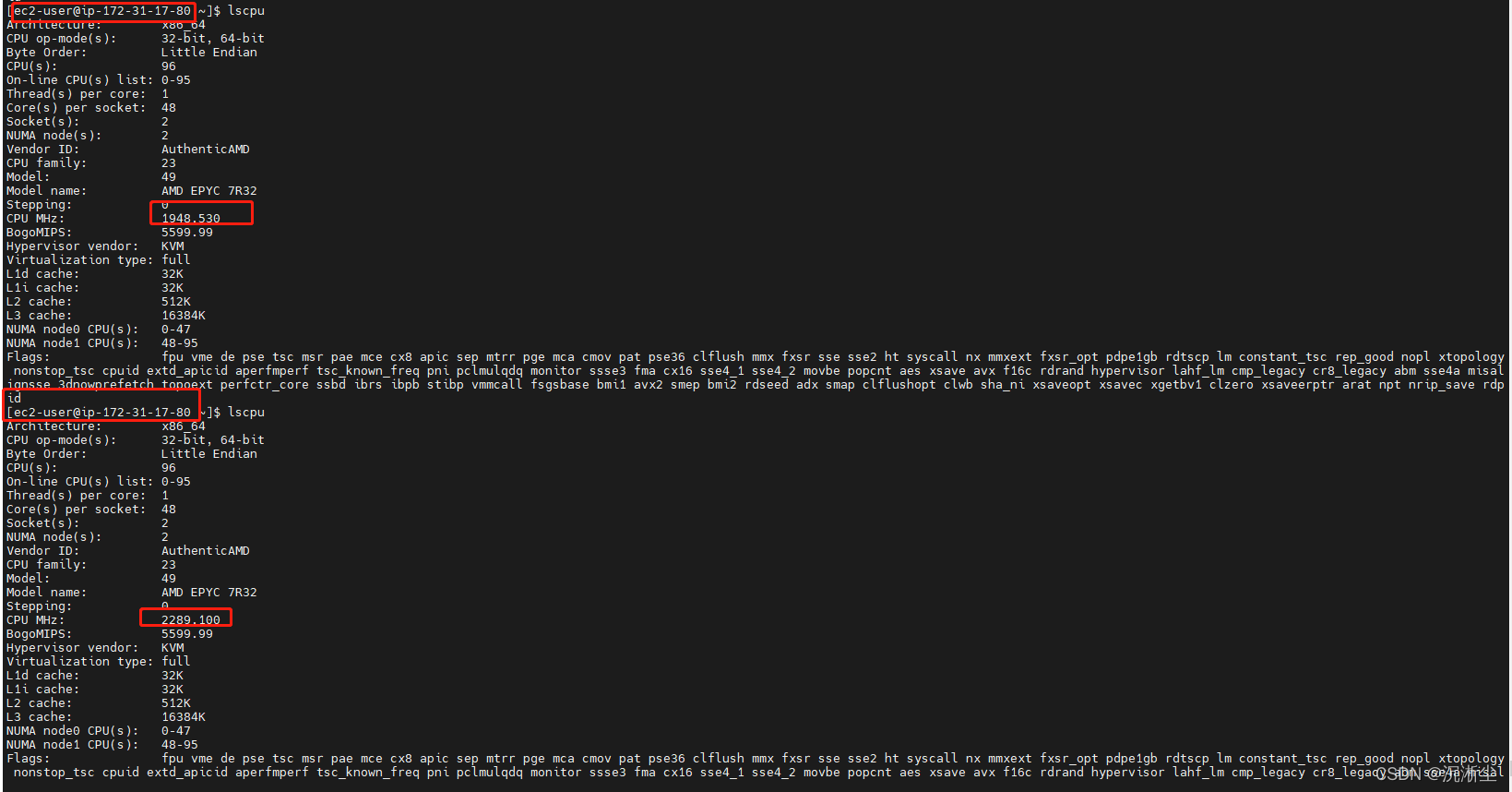
根据Linux帮助手册中关于lscpu命令的有关解释,该命令从sysfs, /proc/cpuinfo中采集CPU架构的相关信息。不管是POD还是在节点中运行该命令,它采集的数据来源都是相同的,即它反映的是所在主机CPU的主频信息。有关该命令的详细信息可以参考以下链接:
https://man7.org/linux/man-pages/man1/lscpu.1.html
使用的AMI文件中该命令的版本为2.30.2,在多核CPU环境下,该版本的lscpu命令只能显示第一颗CPU当前的主频信息。有关信息请参考这个链接:
https://github.com/util-linux/util-linux/issues/1314
可以使用以下命令查看版本:
$sudo lscpu -V
问题原因
节点使用的hpc5a.48xlarge实例类型采用的是AMD架构的CPU,该架构的CPU采用AMD的“Turbo Core”技术,主频会随着系统当前功耗,温度等情况变化,最高主频可以达到3.3 GHz。因此,两个Node的主频出现的变化可以视为正常。另外一些节点及节点上运行的pods中的cpu主频基本稳定在3200,如果这些节点同样运行在基于AMD架构的hpc5a.48xlarge实例上,表现应与前两个实例类似。lscpu命令在每一次运行显示的结果会根据当前所在主机系统的运行情况变化。使用以下命令来观察CPU主频每秒钟一次的变化情况:
watch -n1 "grep \"^[c]pu MHz\" /proc/cpuinfo"
四、Pod挂载EFS出错
错误一:挂载失败
err="orphaned pod \" 7e60535e-xxx0-xxxx-xxxx-c222xxx\" found, but error not a directory occurred when trying to remove the volumes dir" numErrs=2
# 查看对应的Deployment
Unable to attach or mount volumes: unmouted volumes=[volume-lolq01], unattached volumes=[volume-lolq01 kube-api-access-6vm5c]: time out waiting for the condition
从上面的错误只能知道是挂载失败,但不确定具体那一步出错,还需要继续检查
排查思路
- 检查是否安装
EFS CSI Driver - 检查
efs安全组和IAM policy - 检查
PV、PVC、StorageClass - 检查已安装的
CSI Driver的daemonset
错误二:EFS CSI驱动错误
MountVolume.MountDevice failed for volume "pvc-xxxx" : kubernetes.io/csi: attacher.MountDevice failed to create newCsiDriverClient: driver name efs.csi.aws.com not found in the list of registered CSI drivers
从错误中看到没有CSI驱动
有两种情况,第一种的确没有驱动,第二种驱动版本不对
解决方法
重新安装EFS CSI Driver
helm repo add aws-efs-csi-driver https://kubernetes-sigs.github.io/aws-efs-csi-driver/
helm repo update
helm upgrade -i aws-efs-csi-driver aws-efs-csi-driver/aws-efs-csi-driver \
    --namespace kube-system \
    --set image.repository=602401143452.dkr.ecr.us-west-2.amazonaws.com/eks/aws-efs-csi-driver \
    --set controller.serviceAccount.create=false \
    --set controller.serviceAccount.name=efs-csi-controller-sa
602401143452.dkr.ecr.us-west-2.amazonaws.com 更改为集群所在区域的地址
错误三:CSI daemonset权限错误
Error creating: pods "esf-csi-node-" is forbidden: error looking up service account kube-system/efs-csi-node-sa: serviceaccount "esf-csi-node-sa" not found
从错误中看出,驱动没有Serviceaccount
解决方法
创建IAM策略与角色并绑定到集群的Serviceaccount
curl -o iam-policy-example.json https://raw.githubusercontent.com/kubernetes-sigs/aws-efs-csi-driver/v1.3.2/docs/iam-policy-example.json

aws iam create-policy \
    --policy-name AmazonEKS_EFS_CSI_Driver_Policy \
    --policy-document file://iam-policy-example.json

eksctl create iamserviceaccount \
    --name efs-csi-controller-sa \
    --namespace kube-system \
    --cluster <cluster-name> \
    --attach-policy-arn arn:aws:iam::<Account ID>:policy/AmazonEKS_EFS_CSI_Driver_Policy \
    --approve \
    --override-existing-serviceaccounts \
    --region us-west-2